Privacy & Trust
PromptForce runs entirely on your machine. Your prompts go directly from PromptForce to the upstream API (Anthropic or OpenAI), nobody else sees them.
What PromptForce logs
Logged on your machine only. None of this is sent to PromptForce.
Every request writes one row to a local SQLite database at
~/.prefex/data/prefex.db. The row contains:
| Field | Logged | Example |
|---|---|---|
| Timestamp | Yes | 2026-03-27T14:23:01Z |
| Channel | Yes | claude_code |
| Mode | Yes | live |
| Model used | Yes | claude-haiku-4-5-20251001 |
| Input tokens | Yes | 1024 |
| Output tokens | Yes | 312 |
| Cost (USD) | Yes | 0.0003 |
| Router decision | Yes | weak |
| Cache hit | Yes | true |
| Latency (ms) | Yes | 72 |
| Response text | Never | - |
| System prompt text | Opt-in | Off by default. Stored locally, for cache analysis, only if kv_cache.store_system_prompt_text: true. |
| API keys | Never | - |
Your prompts go only to the models you use
Prompts, responses and tool output go only to the LLM provider you configure, never to us. The SQLite database is local. The dashboard reads from that database.
- Side jobs (
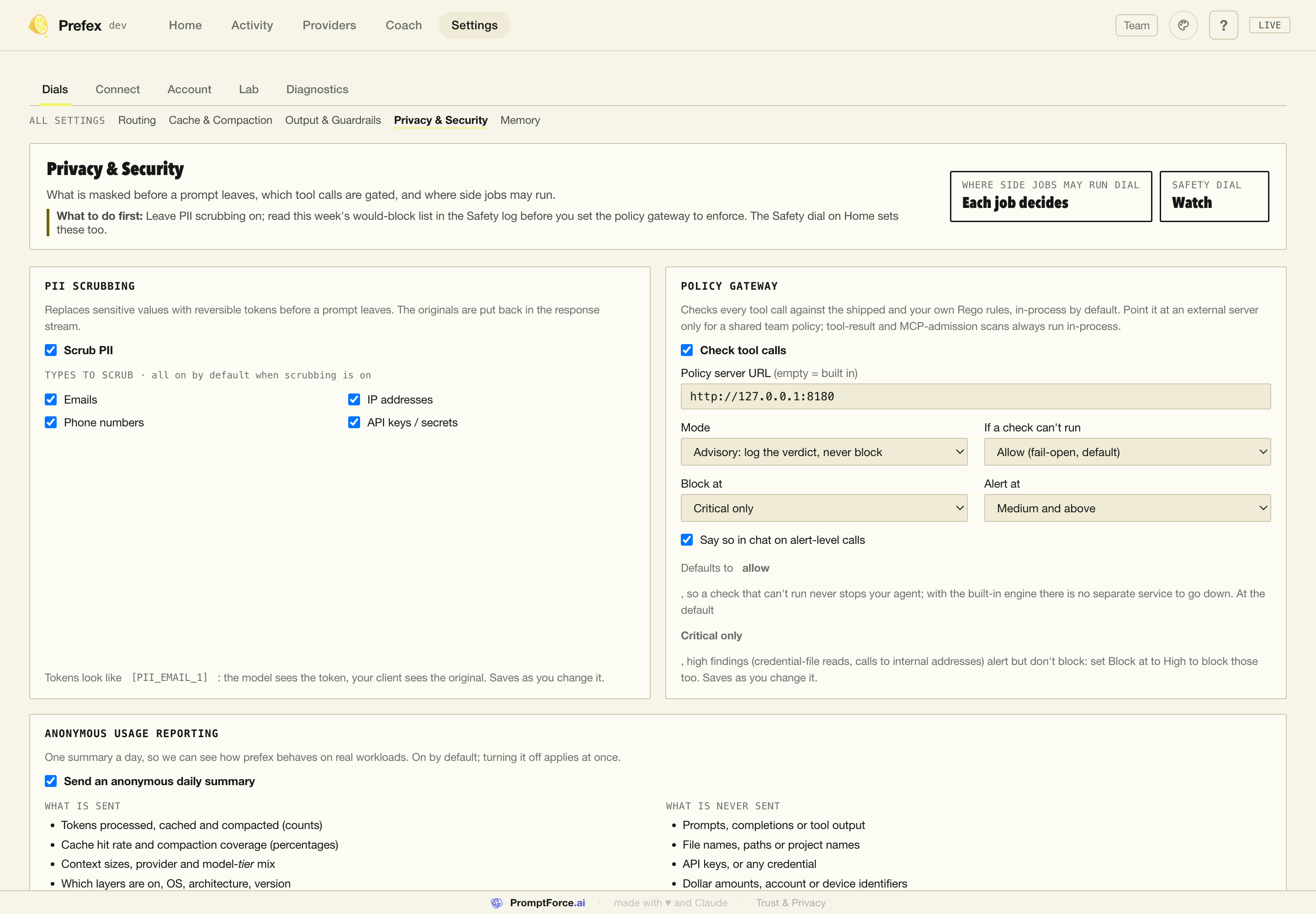
@prefex-auto,/pf-delegateand the delegate tool, on by default) send a self-contained task, and files it names, to a model you can use: Ollama on your own machines, or a hosted provider whose key you added. Each job runs only at the privacy level it allows (keep on my machines < providers that state they don't train < any provider); credentials and personal data stay on your machines. Your main conversation never moves to another model. Turn it off withoffload.enabled: falseor limit it with/pf-pin level local. - PII scrub (
pii_scrub, opt-in) swaps emails, phone numbers, IP addresses and SSNs for placeholders before the request leaves, and restores them in the response, including tool arguments. - Hosted guardrails are off unless you add one. When you do, the newest user turn (and, with streaming checks on, response text) goes to the provider you configured. The built-in regex guardrail runs locally.
- Signed audit chain (
audit_chain.enabled, off by default) writes Ed25519-signed, hash-chained policy and guardrail decisions to~/.prefex/audit/chain.jsonl. Verify it under Activity → Guardrails. - OTLP traces (
telemetry.otlp_endpoint) carry model, token and timing attributes to your own collector, never prompt text.
What PromptForce sends us
Two things are sent automatically: an anonymous daily usage report, on by default and easy to turn off, and the licence check below. PromptForce is built by a very small team, and one usage summary per day is how we know whether it works outside our own machines. It is counts and percentages only:
| Field | Example |
|---|---|
version, os, arch | v1.19.1, darwin, arm64 |
tokens_processed, turns, sessions, active_hours | 150700000, 290, 29, 0.8 |
avg_context_tokens, peak_context_tokens | 519000, 860000 |
tokens_cached, cache_hit_pct | 150600000, 91.7 |
tokens_compacted, tokens_compacted_distinct | 3600000, 128000 |
compaction_coverage_pct | 27.9 |
provider_mix, tier_mix, channel_mix | {"Anthropic": 100.0}, {"opus": 79.0} |
layers_on | ["router", "cache", "compression"] |
Never sent: prompts, completions or tool output; file paths, project or
repository names; model names (only the tier, since a name can encode a
private deployment); API keys, session, device or account identifiers;
dollar figures. There is no identifier, so two reports from the same machine
cannot be linked. Our collector stores only fields on a fixed allowlist and
discards anything else. prefex install turns it on without asking (terminal, curl | bash,
or the PromptForce app) and shows this disclosure; nothing is sent before it has
been shown. A re-run or upgrade keeps an earlier off.
Turn it off at any time. We do not nag.
prefex install --usage-reporting      # on at install (the default)
prefex install --no-usage-reporting   # off at install
prefex toggle usage-reporting on|off  # any time afterwards
PREFEX_USAGE_REPORTING=0 curl -fsSL https://promptforce.ai/install.sh | bash   # off via the script
# or: dashboard, Settings · Privacy & Security, Anonymous Usage Reporting
Other outbound requests
Install ping. When install.sh or install.ps1 finishes, it sends one
request to promptforce.ai/api/ping with the version, OS, architecture, and
whether it was an install or an upgrade. Nothing else, once per install or
upgrade. PREFEX_USAGE_REPORTING=0, PREFEX_NO_PING=1 or
DO_NOT_TRACK=1 suppresses it.
Update check. Once a day PromptForce asks GitHub for the latest public release
tag and compares it locally. The request carries nothing about your install.
Turn it off with prefex toggle update-check off.
Opt-in only: prefex advisories (downloads a signed file, sends nothing),
the marketplace catalog download (telemetry.enabled, off by default),
leaderboard submission (aggregate numbers plus the username and email you
enter, only when you click Submit), and endpoints you configure yourself, such
as a policy gateway, hosted guardrails, or an OTLP collector.
The full legal text is in the Privacy Policy.
Verify with tcpdump
Run this while PromptForce is active:
# Capture outbound HTTPS from this machine
sudo tcpdump -i any -n "dst port 443" 2>/dev/null

# Expect your LLM provider (e.g. api.anthropic.com), plus once a day GitHub's
# release API unless you turned it off, the licence check (promptforce.ai, on start
# and daily), and the daily usage report unless you turned it off.
Binary verification
The proxy (the prefex binary) is a single standalone binary (about 85–90 MB, depending on platform) with zero external dependencies.
# Check the binary
ls -lh $(which prefex)
# Output: about 85-90MB
License
PromptForce is free until it saves you $500 beyond native prompt caching. No credit card. The licence key is verified offline on your machine. So that a reinstall doesn't reset the meter, PromptForce sends a small licence check to promptforce.ai on start and once a day: a salted hash of the machine id, the binary version, the key id ("free" for the built-in key) and three numbers (value added on this machine, value added under the key, and when it ran out). No prompt, path, email or IP is stored, and if the check can't be reached PromptForce keeps running on its local meter. Nothing else is sent.
At 80% of the allowance the dashboard warns you. When it runs out, 15 days of
grace follow, and then PromptForce stops: it hands Claude Code and Codex back to
their direct connection, drains, and exits. It never turns into a proxy that
refuses your requests. Apply a key with prefex license apply <key>
(works with the daemon stopped) or in Settings → Account.
What you get
PromptForce ships as pre-compiled Go binaries. The proxy is proprietary. The embedded rules-based router runs entirely in-process, no external ML services needed.
What the codebase brief keeps local
PromptForce reads your codebase and git history on your own machine and hands the brief to the AI assistant you already use. It sends nothing to us.
| Data | Leaves your machine |
|---|---|
| Source code | Never |
| Git history and authorship | Never |
| Readiness scores and reports | Never (stored in your repo) |
| Dependency graph and blast radius | Never |
| Licence check | Never (checked offline) |
What it writes to your repo: guidance files (CLAUDE.md, AGENTS.md), guard rules and a local index, as plain files you can read, diff, commit or delete. It goes online only for features you turn on, such as GitHub status checks or a security advisor you add your own key for, so it runs fully offline by default.
Questions
Open an issue or discussion at github.com/PromptForcePrime/prefex for anything privacy, data, or security related.